
Case: films & shows
Who this is for: people who already binge shows and movies; parents building a language environment for kids.
Screen stories are the best speaking material — plot helps you guess meaning, dialogue is real spoken language, and you wanted to watch it anyway. The one thing that decides everything is subtitle quality: for a two-hour film, AI transcription is slow, costs credits and may still be wrong, while a human-proofread subtitle found online is far better.
Step 1: pick the right show
Section titled “Step 1: pick the right show”| Level | Pick | Why |
|---|---|---|
| Beginner | Animation, sitcoms | Slow speech, short lines, clear voices, visuals carry meaning |
| Intermediate | Urban drama, documentaries | Natural pace, everyday vocabulary |
| Challenge | Crime, legal, fast-talk comedies | Jargon, speed — a stretch you can reach |
Length matters too: a 20–45 minute episode is easier to stick with than a two-hour film — finishing one episode is a complete win, while films tend to stall halfway.
Step 2: find the subtitle (this decides everything)
Section titled “Step 2: find the subtitle (this decides everything)”Search in this order:
- Proofread subtitles: search subtitle sites for “title + srt”, pick a well-rated one. It’s an
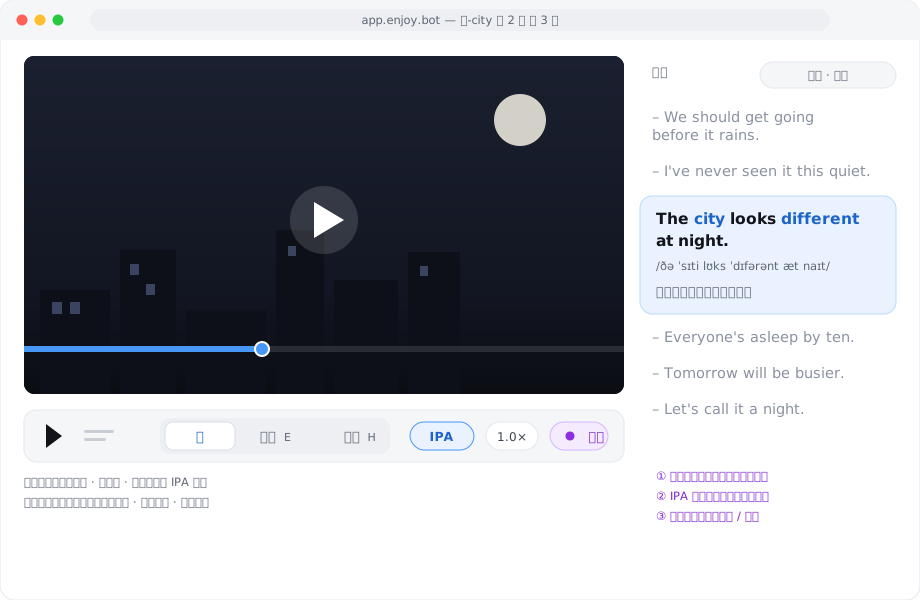
.srtor.vttfile — import it with the video. For a translation to read against, grab a dual-language subtitle (original line, translated line) or import a second, proofread Chinese track — the player shows primary and secondary tracks together. Make sure the subtitle matches your video’s version — the same film can have different cuts/framerates, which shift timing overall; mismatches are fixable, see below. - Muxed-in subtitles: MKV files often carry subtitle tracks. After importing, press Extract subtitles in the player; it lists every track (language, format) — preview and pick the best one.
- AI transcription: only for short clips where no subtitle can be found. Films run one to two hours: transcription is slow, costs credits, and music or crowd noise degrades quality.
Step 3: align once, unlock word-by-word
Section titled “Step 3: align once, unlock word-by-word”First thing after importing: press Align in the player. Enjoy re-fits the proofread subtitle to this video’s audio word by word:
- word-by-word highlighting turns on — the underline follows playback;
- the IPA toggle becomes available — see the phonetics when your ear can’t catch a word (first enable downloads engine data, so it’s slow once);
- overall drift between subtitle and audio gets corrected too.
Proofread subtitles have accurate text; alignment makes it fit this video’s sound. You need both.
Step 4: one episode per week
Section titled “Step 4: one episode per week”Split a 40-minute episode like this (20–30 minutes a day):
| Day | What to do |
|---|---|
| Mon | Listen to the whole episode with subtitles on, look up words (tap into vocabulary), no shadowing |
| Tue–Thu | Echo 5–8 lines: the practice loop (listen → shadow → compare), watch the score and pitch contour |
| Fri | Dictate those lines: check you really hear them instead of guessing from text |
| Weekend | Review the episode’s words in vocabulary (spaced review schedules itself) |
One episode done well beats ten watched with subtitles drifting by. Then pick the next one and repeat.
The kids’ animation version
Section titled “The kids’ animation version”- Pick animation with slow speech, short lines and lots of repetition (educational shows are best — their lines repeat on purpose);
- Parents handle import and alignment; kids only do two things: listen and echo;
- No scores, no streaks — 15 minutes a day, and “talking along with the cartoon” stays fun;
- The same episode can be practised again and again — kids love repetition, and repetition is exactly what acquisition needs.
Common pitfalls
Section titled “Common pitfalls”- Subtitle doesn’t match the audio → fix the text in Edit, or re-run alignment;
- Video won’t play → the MKV may carry HEVC; transcode to MP4 (H.264) or use Enjoy Player;
- Browser can’t import the big file → switch to Chrome / Edge / Brave;
- Just want to watch an episode casually → a pure listen + word lookup session is fine too — no pressure, the material stays in your library.
Found something wrong or outdated?Open an issue